How Linny works
Linny is a foraging app for iPhone, built for Sweden. It has two halves: a forecast of conditions for mushrooms and berries, and your own collection of places, finds and blanks. This page walks through the nine things you meet in the first five minutes.
Nine things, in the order you meet them
1Three rooms
Map shows the ground. Scout decides the day. Cabinet keeps what you found.
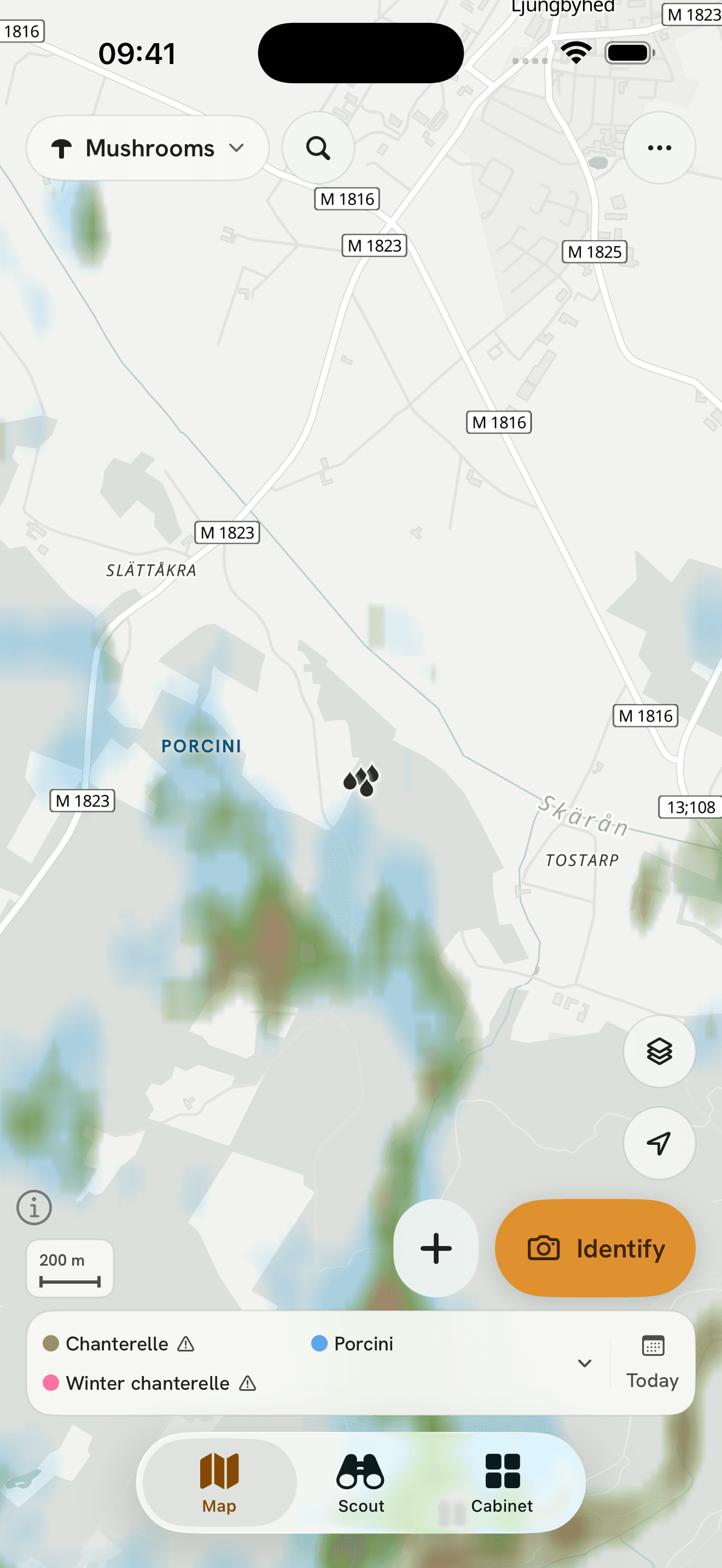
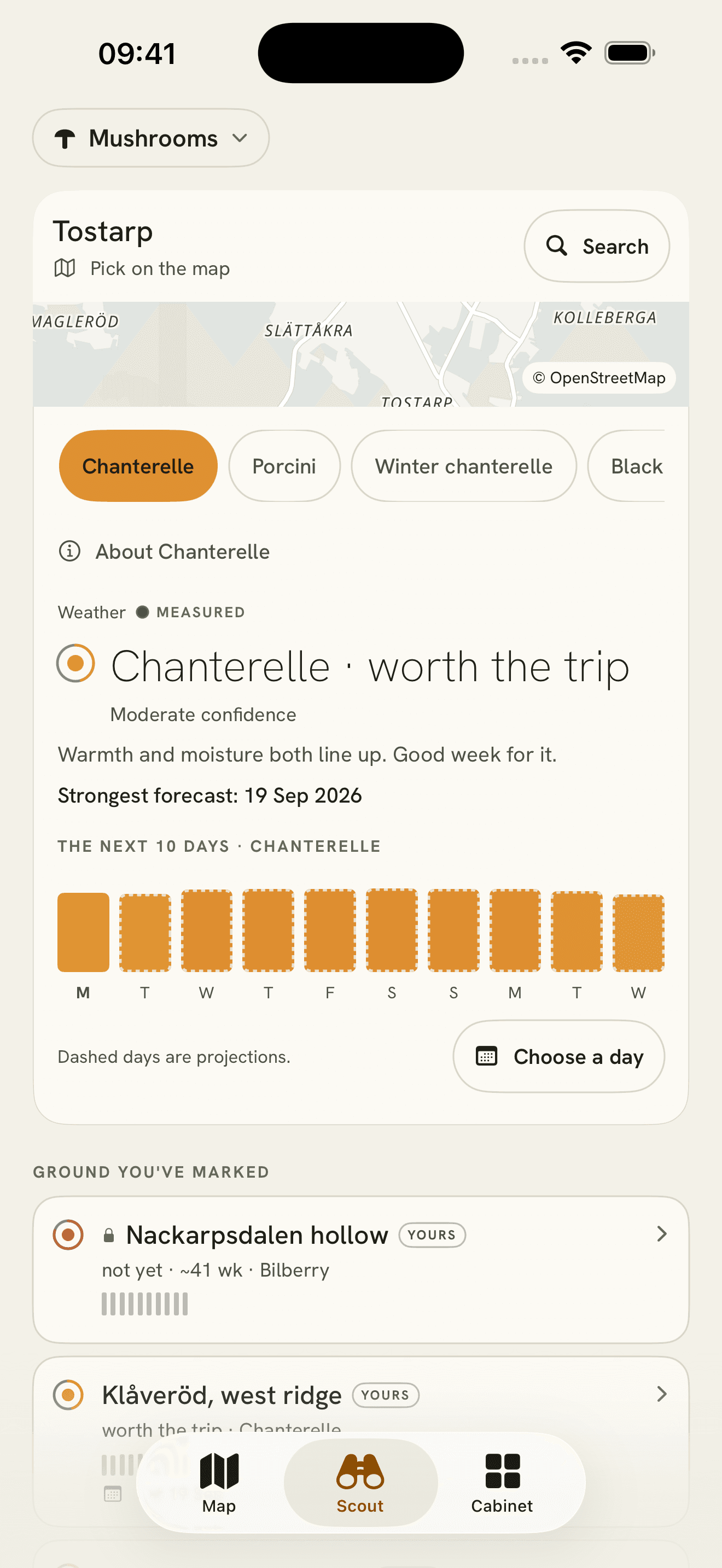
The three tabs along the bottom are the whole app. Map is where you read the terrain for the species you chose. Scout compares the coming days for one place. Cabinet is your collection: every find, every blank and every place you keep.
2Packs
Mushrooms, berries, greens or trees. Switch at the top; the ground is read for that pack.
A pack is one family of things you go out for. The chip in the top-left corner of the map names the current one. Switching it changes which species you can pick and what the map paints.
- Mushrooms
- Berries
- Greens
- Trees
3Species and colour
Pick up to four species. Each gets a colour; the map paints where that species’ ground is.
The row at the foot of the map lists the species you picked, each with its dot. The same colour paints the ground: the olive patch is chanterelle ground, the blue patch is porcini ground. Where two colours meet, the ground suits both.
4The signal dot
Colour is how good it looks. The arc is how sure we are. An empty circle means we cannot say.
The dot sits beside every read in Scout and on every place card. A full-colour disc inside an almost complete arc is a strong read on solid data. A paler disc inside a short arc is a fair read on thin data. A ring on its own is a species or a place without a read this week.
- Strong, sure
- Fair, thin
- No read
5Fruiting and habitat
Fruiting shows this week’s read. Habitat shows the ground itself, whatever the weather.
The layers button on the map switches between them. Fruiting moves day by day with rain and warmth. Habitat is slope, wetness, aspect and forest type, and it looks the same in a dry August as in a wet September. Use habitat to decide where, and fruiting to decide when.
Fruiting · this week
Habitat · the ground
6The marks
A ring is a place you keep. A filled dot is a find. A hollow dot is a blank: you looked, nothing there. Dashed is ground you mean to walk. Grey is someone else’s.
Marks are what you leave on the map. Places are areas you draw and name. Finds and blanks are logged visits, and a blank counts as much as a find: it tells next year’s you where the ground was quiet. Dashed ground is scouting you plan to do. Grey marks are public places other people have published.
- Place
- Find
- Blank
- To walk
- Someone else’s
7Which day
Tap the date to see the next ten days. The star is the best of them.
Scout lays the ten days out as bars, one per day; the first is solid and the rest are dashed because they are projections. Choose a day and the map repaints for it. The date chip on the map shows which day you are looking at.
8Add and Identify
Plus logs a find or saves a place. Identify photographs a mushroom and shows possible matches. You decide what it is.
Both sit in the bottom right of the map, under your thumb. Plus opens the log: a find, a blank or a new place, with a photo if you want one. Identify takes a photo and returns a shortlist of species with reference pictures to compare against.
9Measured and estimate
MEASURED means a weather station reported it. ESTIMATE means a model filled the gap.
The label sits above every weather read in Scout, with a small dot before it. A filled dot and MEASURED mean the nearest SMHI station reported the numbers, and the station is named. A hollow dot and ESTIMATE mean no station reported and a forecast model filled in.
Still stuck?
Write to us and say what you were trying to do. We read every message.